
Feedqip for Small & Medium Businesses
Every piece of customer feedback is a signal — ignore enough of them and you'll keep solving the wrong problems. This guide shows how SMB owners use Feedqip to stay close to what customers actually need.
Why tracking feedback matters
When you run a small or medium business, every customer interaction carries weight. A single frustrated review can steer dozens of prospects away, while a pattern of positive comments can reveal an advantage you didn't know you had.
Scenario
Maria runs a bakery with an online ordering system and a catering service. Last month, several customers emailed about late catering deliveries, a few left reviews about stale bread in online orders, and one social media post praised the custom cake designs. Maria saw each message separately but never connected the dots — the catering complaints were all tied to a single driver route that was consistently delayed.
Without a single place to capture and organize this feedback, patterns like Maria's delivery bottleneck stay invisible until they become costly. Feedqip gives you that single place — every email, form response, and API webhook lands in one feed, auto-classified by topic and sentiment, so you see the full picture before small issues become big problems.
Organize feedback by product or operation
If you sell multiple products or services, mixing all feedback into a single bucket defeats the purpose. Feedqip lets you create a separate product for each offering — or each distinct operation within an offering — so feedback stays organized from the start.
Example product structure for Maria's bakery
Online Ordering
Tracks feedback about the e-commerce experience, packaging, freshness
Catering Service
Tracks delivery timeliness, menu variety, event-day experience
Custom Cakes
Tracks design consultation feedback, taste testing, order accuracy
How to create a product
-
1
Open the Products page from your dashboard sidebar.
-
2
Click Create Product and give it a descriptive name — something your team will immediately recognize.
-
3
Repeat for each product or operation. There is no limit on the number of products you can create.
Start collecting feedback
Once your products are set up, connect at least one feedback channel so data begins flowing in. Feedqip supports four integration methods — choose the one that fits each product best, or combine several for broader coverage.
Prioritize with clarity scores
Scenario
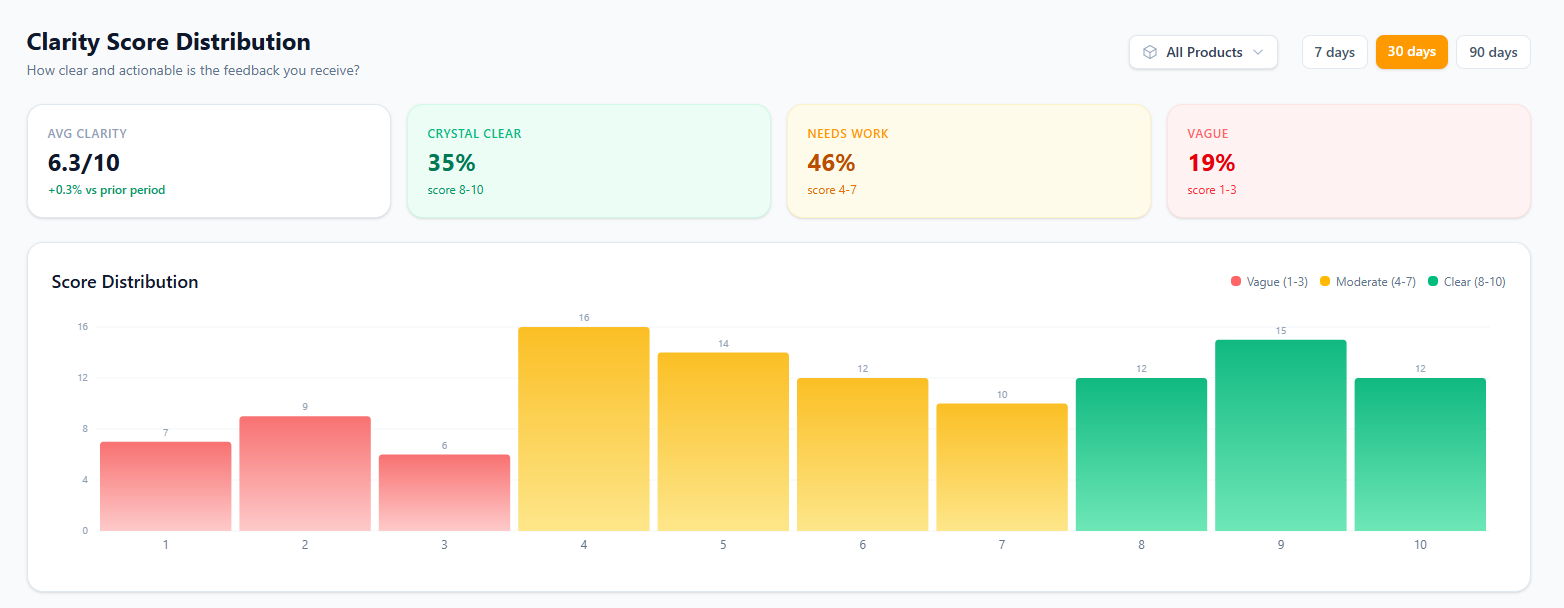
After a week of collecting feedback for her Online Ordering product, Maria has forty new entries. Twelve of them are vague one-liners like "not great" or "could be better." Twenty-two are specific and actionable — descriptions of stale packaging, confusing checkout flows, or missing gluten-free options. Maria can't afford to investigate every message equally.
Feedqip assigns a clarity score (1–10) to every piece of feedback the moment it arrives. High-scoring entries contain specific details — product names, steps to reproduce, concrete suggestions — while low-scoring entries are ambiguous and may need a follow-up.
On the Clarity Scores dashboard, Maria can instantly see the breakdown: how many messages are crystal-clear, how many are moderate, and how many are vague. She filters down to the high-clarity messages first and tackles the top issues — the stale-packaging complaint appears five times in one week, making it the obvious priority.
Spot problems early with sentiment trends
Scenario
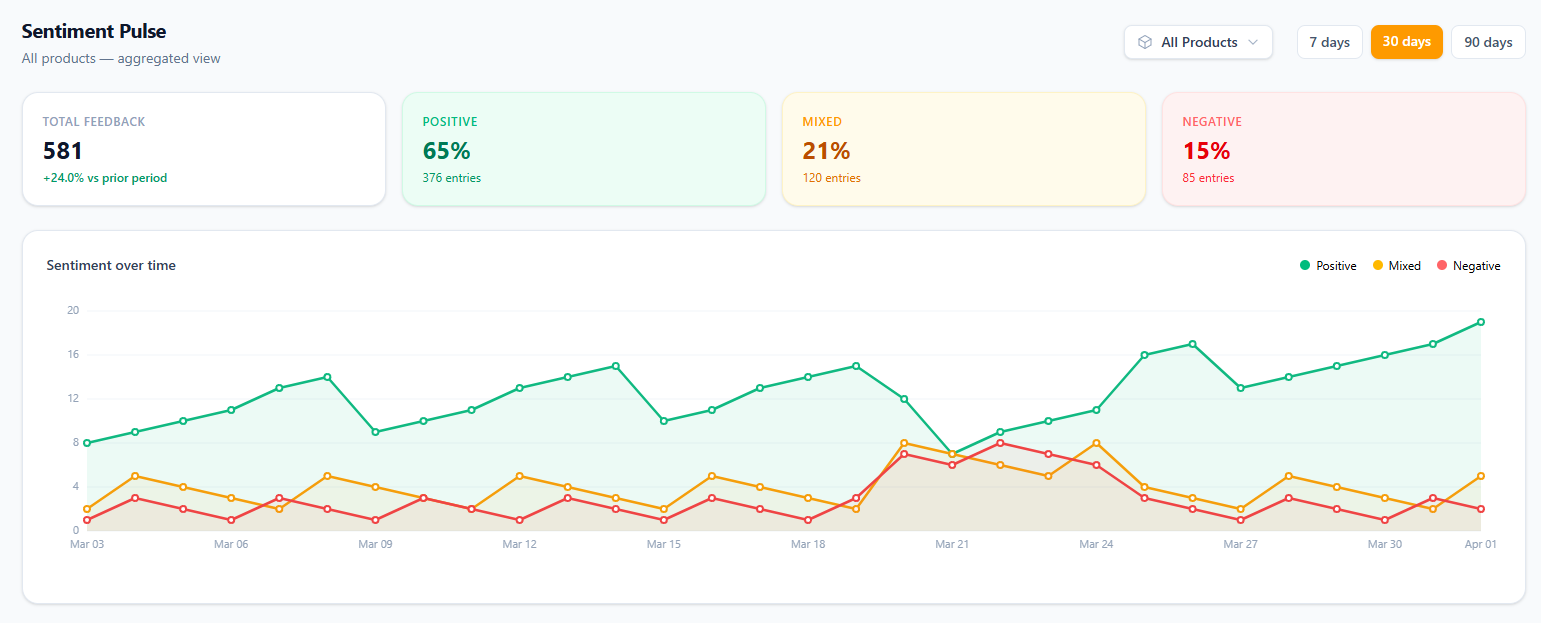
Maria's catering service has had steady 80 % positive sentiment for months. One Monday morning, she opens the Sentiment Pulse and notices a sharp dip — positive dropped to 55 % over the weekend. She drills into the negative entries and discovers five complaints about cold food at a large corporate event. The root cause: a new warming container wasn't working properly.
The Sentiment Pulse gives you a real-time view of how customers feel about each product. Positive, mixed, and negative signals are scored automatically, so you can:
- Spot sudden drops the day they happen — not weeks later in a quarterly review.
- Compare pre- and post-change sentiment to measure whether a fix actually worked.
- Share concrete data with your team instead of relying on gut feeling.
Maria fixes the warming container issue, and within four days the Sentiment Pulse rebounds back to 78 %. She now checks the dashboard every morning — a two-minute habit that has prevented two more issues from escalating.
Discover what's trending
Beyond sentiment, Feedqip automatically groups feedback into entities — recurring topics that emerge from the text. The Rising Entities view ranks these topics by volume change, so you always know which issues are growing.
Scenario
Maria's Custom Cakes product suddenly shows "fondant taste" as a new rising entity with 12 mentions this week — all with negative sentiment. She didn't even know customers cared about the fondant brand. She switches suppliers, and the entity's sentiment flips to 70 % positive within two weeks.
Without rising entities, this fondant issue would have stayed buried in a list of unrelated messages. With Feedqip, it surfaced automatically — saving Maria hours of manual reading and preventing a slow but steady customer loss.