Feedqip for Startups
In the early days, every user conversation is gold. The startups that survive are the ones that listen relentlessly and ship what customers actually need — not what the team assumes they need. This guide shows how to build that feedback loop from day one.
Why startups can't afford to lose feedback
At the earliest stage, your user base is small enough to talk to every customer — but that window closes fast. As you grow from 10 users to 100 to 1,000, Slack messages, support emails, NPS comments, and in-app feedback pile up in disconnected channels. Without a system, the most valuable signals get lost in the noise.
Scenario
Priya and her co-founder just launched a project management tool for remote teams. After a Product Hunt launch, they got 300 sign-ups in a week. Feedback began pouring in — Intercom chats, reply emails to the welcome sequence, tweets, and a few GitHub issues. Two weeks later, they shipped a calendar integration because Priya remembered "several people" asking for it. In reality, only 3 users mentioned calendars. The top request — better notification controls — came from 28 users but was scattered across four different channels.
Feedqip prevents this by funneling every source into a single feed. When every mention of "notifications" automatically lands in the same place, you don't have to rely on memory or keyword-searching five tools. The patterns surface on their own.
Structure your feedback from the start
Even if you only have one product today, your codebase has distinct areas that users experience differently — onboarding, the core workflow, billing, integrations. Creating a product in Feedqip for each area keeps feedback organized and makes it easy to assign ownership as the team grows.
Example product structure for a SaaS startup
Onboarding
Sign-up flow, first-run experience, tutorial completion
Core Product
Task boards, collaboration, real-time editing
Billing & Plans
Pricing clarity, upgrade path, invoicing
Integrations
Calendar sync, Slack bot, API usage
Creating a product
-
1
Navigate to Products in your dashboard.
-
2
Click Create Product. Use a name your whole team recognizes — "Core Product" beats "Project-Alpha-V2."
-
3
Add one or more integration channels. You can always add more later as your product evolves.
Connect your feedback channels
Startups move fast — your feedback tool should too. Connect one or more channels to each product so feedback starts flowing in immediately.
Focus your limited time with clarity scores
Scenario
After their Product Hunt launch, Priya's inbox exploded with 200 pieces of feedback in 10 days. Many were two-word reactions — "looks cool" or "needs work." Others were detailed paragraphs explaining exactly where the onboarding flow confused them and what they expected instead. With a team of two, reading every message equally wasn't an option.
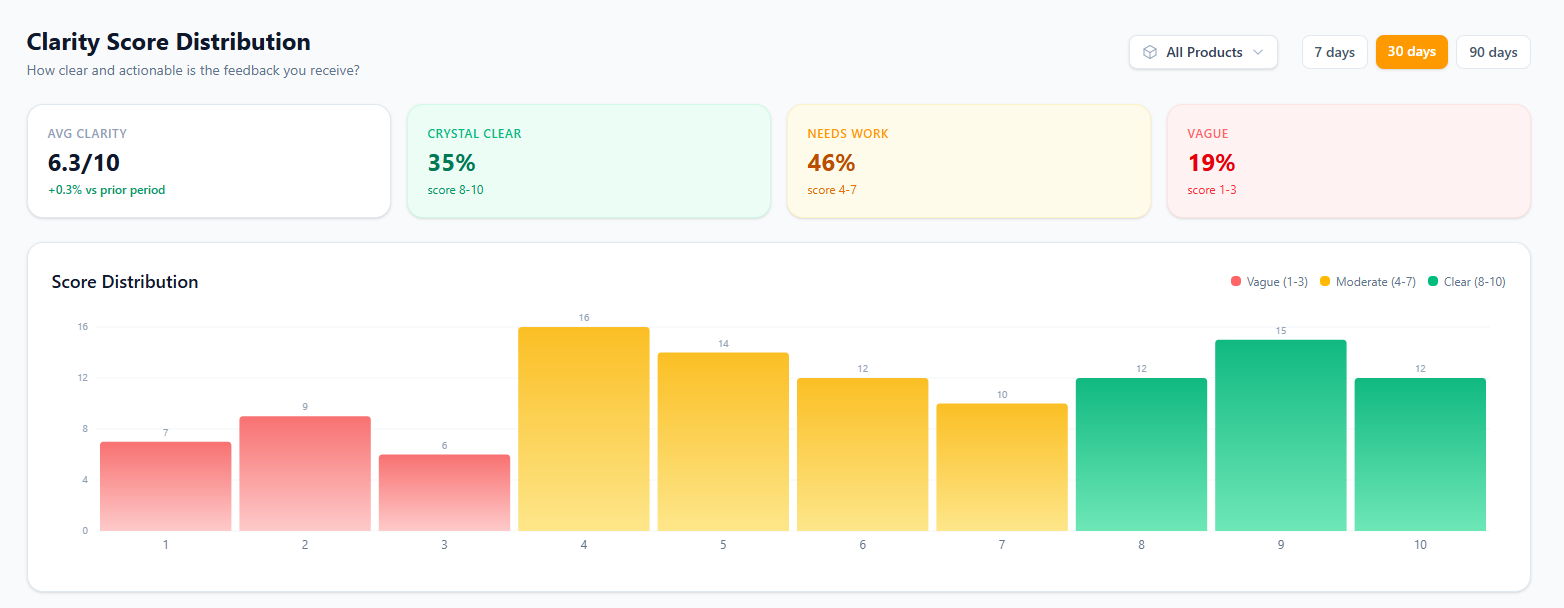
Feedqip's clarity scores rate every entry from 1 to 10. A score of 8 or above means the message contains specifics — feature names, reproduction steps, or concrete suggestions. A score below 4 is vague and may not be actionable without a follow-up.
Priya filters her Onboarding product to clarity ≥ 7 and finds 52 actionable messages. Within an afternoon, she and her co-founder identify the three most common pain points and ship fixes that same week. The next batch of feedback shows a 20 % drop in onboarding-related complaints.
Measure impact with sentiment trends
Scenario
After shipping the onboarding fixes, Priya wants to know if they actually helped. She opens the Sentiment Pulse for the Onboarding product and compares the two weeks before the deploy to the two weeks after. Positive sentiment jumped from 42 % to 67 %, and negative dropped from 35 % to 18 %. She screenshots the chart and shares it in the next investor update — concrete proof that customer experience is improving.
Sentiment trends aren't just a feel-good metric — they're a decision-making tool:
- Detect regressions within 24 hours of a deploy instead of waiting for churn to show up in your MRR.
- Validate that a fix worked before moving on to the next priority.
- Show investors and advisors that you're making data-driven product decisions.
Catch emerging themes before they escalate
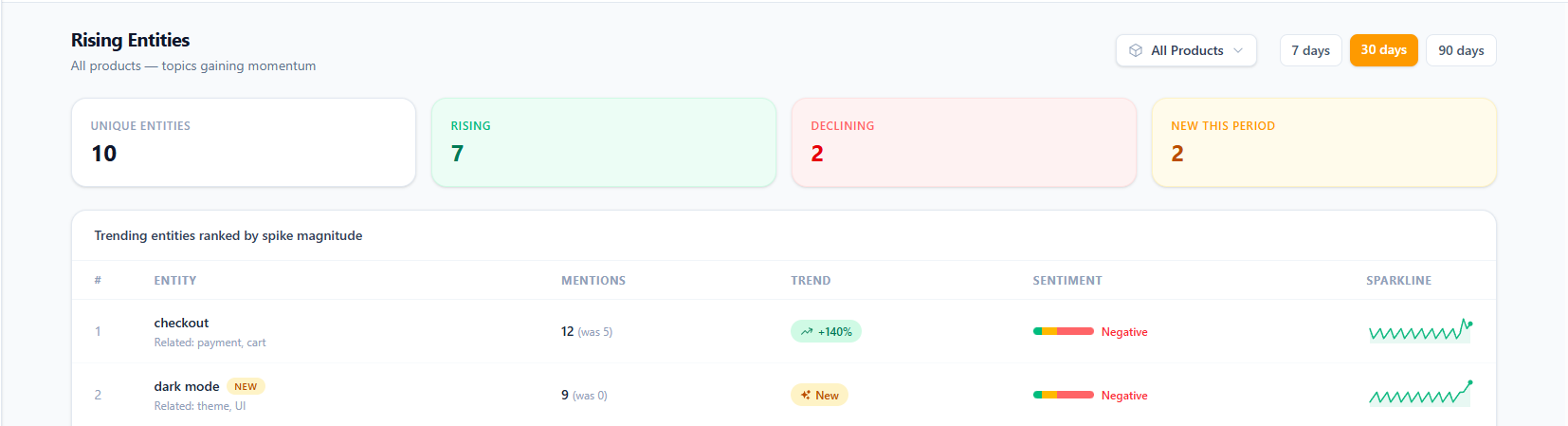
As your user base grows, manually reading every message becomes impossible. Feedqip's Rising Entities automatically groups related feedback into topics and ranks them by how fast they're growing. New topics are flagged so you never miss an emerging trend.
Scenario
Three months after launch, Priya's Core Product board shows a new rising entity: "mobile responsiveness" — 18 mentions this week, all negative. She didn't even have mobile in the roadmap. But the data is clear: users are trying to use the app on phones and having a bad time. She bumps mobile support up the priority list and ships a responsive layout in the next sprint. The entity's sentiment flips positive within two weeks.
Without rising entities, mobile responsiveness would have stayed a "nice to have" on a backlog far from the top. With Feedqip, it surfaced as an urgent need — backed by real user evidence, not a hunch.